The Balanced Scale Pairs System
Podcast: The Saxophone Knowledge and Mastery Podcast
- Season: 3 (Episodes 41 - 60)
- Episode: Special Episode
- Title: The Balanced Scale Pairs System
- Release date: September 8, 2026
- Produced by: Djere Services Group (https://djere.com/)
- Audio generated using: Gemini Notebook (https://notebooklm.google.com/)
- Audio and video edited using only Free Software/open-source software (FOSS): Shotcut (https://www.shotcut.org/)
- Associated article: https://saxtalk.com/the-balanced-scale-pairs-system.html
Executive Summary
I used to learn songs by ear and through sight-reading by transposing them into all twelve keys, and then learning the song in one random key at a time until I mastered playing it in all 12 keys. It worked, but it lacked a cohesive structure. A few months ago, I had a breakthrough to improve this process: I realized I could organize my practice into symmetrical, balanced key pairs.
That realization became the Balanced Scale Pairs System (sometimes in this article, I call it the "Balanced Key Pairs System": the 2 terms are interchangeable). Instead of jumping to random keys, I always start by learning a song in its original key. From there, I tackle the piece in a balanced pair during the same practice session, matching the number of sharps with the corresponding number of flats. For example, I will practice the key with one sharp alongside the key with one flat. I progress systematically through all seven pairs until I have mastered the song in all 12 keys.
The beauty of this method lies in the mathematical symmetry of transposing the original audio. To generate the two components of any balanced key pair using Audacity, I simply shift the pitch by the exact same magnitude of semitones in opposite directions. For example, let's assume that the original song is in C major (0 sharps/0 flats). The 1st balanced key pair would consist of the song in G major (1 sharp) and F major (1 flat). To create the G major version, I transpose the C major version down 5 semitones in Audacity. Conversely, to create the F major version, I transpose the C major version up 5 semitones. I then export and organize these tracks using a logical file naming convention, and I repeat the process until I have 7 balanced key pairs.
Keywords: Balanced Scale Pairs System, ear training, sight-reading, transposing, 12 keys, balanced key pairs, Audacity, pitch shifting, semitones, music practice
Introduction
A few months ago, I had a realization: I could study playing songs by ear (and also sight-reading songs) in key pairs. For example, I recently wanted to learn how to play Anita Baker's "Angel" in all 12 keys. In my old system, I would transpose the "Angel" mp3 to all 12 keys using Audacity. Then, I would play along with it in a random key until I had mastered it in all 12 keys. Now, I have a more systematic approach: I learn the song by ear in balanced key pairs. So I'll start by learning it in the original key. To simplify things, let's assume that Anita Baker's "Angel" is in the key of C major on the alto sax.
(NOTE: when learning a song by ear, it really doesn't matter what key the song is currently in: I can still execute the system as described below esentially pretending that the song is in A minor/C major regardless of what key it's actually in. However, if I'm sight reading a song, I always want to start the system in the key with no sharps and no flats, so I'll transpose the sheet music into that key if it's not there already. Now, back to our discussion...):
I would learn "Angel" by ear in C major first. Then, I would learn it in the G major (1 sharp) and F major (1 flat) balanced scale pairs during the same practice session. Then I would repeat this process until I mastered playing the song by ear in all 12 keys. Technically speaking, it's actually 15 keys: 7 key pairs x 2 = 14 keys + the original key = 15 keys.
After I developed this system during my ear training sessions, I decided to expand it to my sight-reading sessions. So I would first learn to sight-read "Angel" in C major. Then, I would learn to sight-read it in the G major (1 sharp) and F major (1 flat) balanced scale pairs during the same practice session. Again, I would repeat this process until I mastered the song in the original key and all 7 balanced key pairs.
Creating Balanced Key Pairs Using Audacity
As I started creating the balanced key pairs using Audacity, I noticed a beautiful symmetry between the two components of each key pair. For example, if "Angel" is in C major (0 sharps/0 flats), then you have to transpose it down 5 semitones in Audacity to transpose it to the closest G major (1 sharp). Conversely, to transpose it to the closest F major (1 flat), you have to transpose it up 5 semitones in Audacity. The symmetry holds for all 7 key pairs: you always transpose in the exact same magnitude, but in the opposite directions, to create the two components of a key pair.
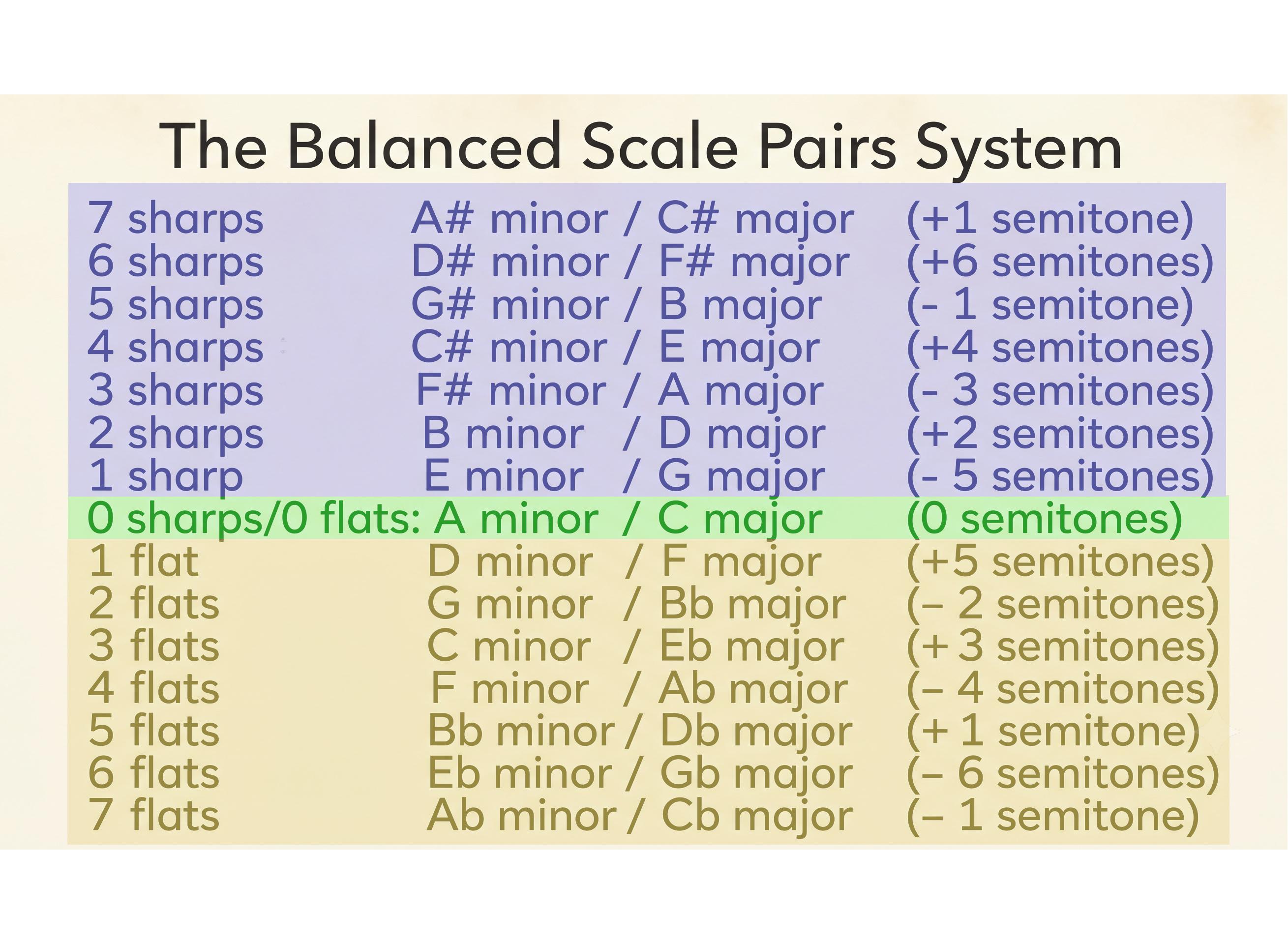
Here is the Balanced Scale Pairs System:
The Balanced Scale Pairs System
--- */
Key Signature Minor / Major Keys Interval Shift
7 Sharps A# minor / C# major +1 semitone
6 Sharps D# minor / F# major +6 semitones
5 Sharps G# minor / B major -1 semitone
4 Sharps C# minor / E major +4 semitones
3 Sharps F# minor / A major -3 semitones
2 Sharps B minor / D major +2 semitones
1 Sharp E minor / G major -5 semitones
/* --- */
0 Sharps / 0 Flats A minor / C major 0 semitones
/* --- */
1 Flat D minor / F major +5 semitones
2 Flats G minor / Bb major -2 semitones
3 Flats C minor / Eb major +3 semitones
4 Flats F minor / Ab major -4 semitones
5 Flats Bb minor / Db major +1 semitone
6 Flats Eb minor / Gb major -6 semitones
7 Flats Ab minor / Cb major -1 semitone
As you can see in the table above, if I wanted to transpose "Angel" from C major to G major, I would have to transpose it down 5 semitones in Audacity. To do so, I would open the C major version of the song in Audacity. Then I would select the entire song, and click on "Effect" in the menu bar => "Change Pitch" => "Semitones (half-steps): -5.00" => check "Use high quality stretching slow" => hit "Apply". Then you would go to "File" in the menu bar => "Export Audio" and export the song to an appropriately named file on your computer system. Here is the naming convention I use:
/* "Angel" in G major (1 sharp): */ 01a_baker_anita_angel.mp3
/* "Angel" in F major (1 flat): */ 01b_baker_anita_angel.mp3
/* "Angel" in D major (2 sharps): */ 02a_baker_anita_angel.mp3
/* "Angel" in Bb major (2 flats): */ 02b_baker_anita_angel.mp3
/* "Angel" in A major (3 sharps): */ 03a_baker_anita_angel.mp3
/* "Angel" in Eb major (3 flats): */ 03b_baker_anita_angel.mp3
/* "Angel" in E major (4 sharps): */ 04a_baker_anita_angel.mp3
/* "Angel" in Ab major (4 flats): */ 04b_baker_anita_angel.mp3
/* "Angel" in B major (5 sharps): */ 05a_baker_anita_angel.mp3
/* "Angel" in Db major (5 flats): */ 05b_baker_anita_angel.mp3
/* "Angel" in F# major (6 sharps): */ 06a_baker_anita_angel.mp3
/* "Angel" in Gb major (6 flats): */ 06b_baker_anita_angel.mp3
/* "Angel" in C# major (7 sharps): */ 07a_baker_anita_angel.mp3
/* "Angel" in Cb major (7 flats): */ 07b_baker_anita_angel.mp3
Conclusions
This is a pretty simple system, but once I discovered it, I knew that I had to share it with my fellow musicians. Thank you so much for reading this article/watching this video!